Build your first game
Choose an engine and work through the build checks.
Guide progress only. You confirm the checks; this website does not scan your computer or verify builds.
Watch the setup recordingStep 1 of 8
Prepare your project and computer
Use the engine and version named by the project.
Use a Windows 11 x64 or Linux (Ubuntu 24.04 LTS) x64 computer and a working game project. Choose its engine so the requirements match your project. Keep a backup and enough disk space for an isolated source snapshot and the resulting build.
What you should see
You know the engine and project version, have access to the source, and can identify a supported Windows or Linux target. Unity and Unreal require a target matching the build computer; supported Godot cross-exports remain available.
If something does not match
If the engine or version is unclear, inspect project.godot, Unity ProjectVersion.txt, or the .uproject metadata. Do not upgrade the project just to match a tool already installed.
Open the recovery guideInstall frameDock
Choose a Windows or Linux installer from the public download catalog and check its checksum. Install and launch frameDock. Sign in to your frameDock account using the email link and matching application code.
What you should see
After sign-in, the application opens into your local workspace. A valid signed session supports offline use.
If something does not match
Check the package architecture and supported operating system. Windows needs WebView2; Linux needs GTK, WebKitGTK and Secret Service. The installer explains missing dependencies.
Open the recovery guideOpen the game project
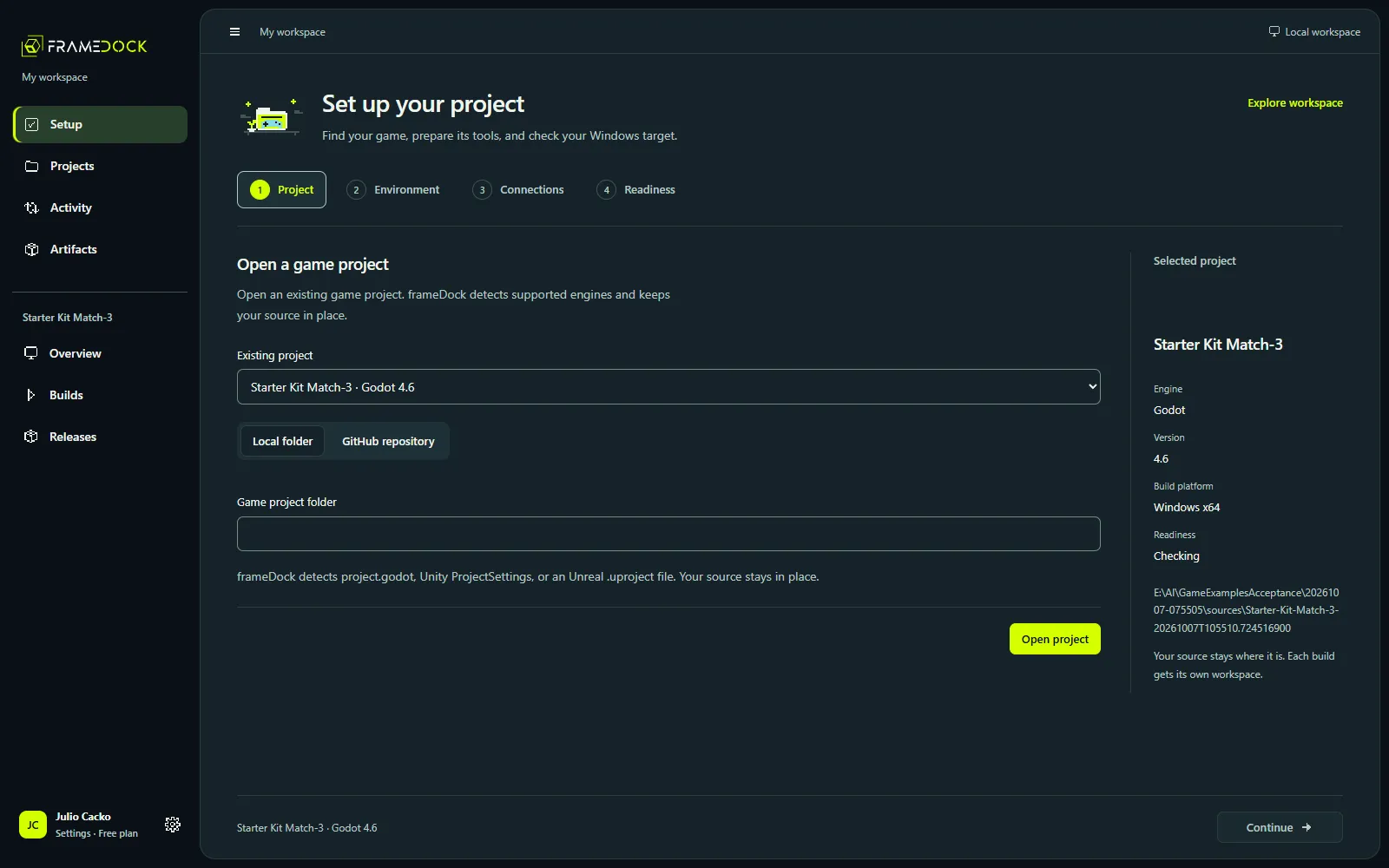
Choose Open project, or use Setup → Project. Select your local folder or an authorized GitHub repository. For the shortest first-build path, use a local project; GitHub authorization is optional.
What you should see
The project overview shows the correct engine and version. Project source is detected, and the source remains in its original location.
If something does not match
Select the folder containing the engine’s project file, not a parent workspace or a built-game executable. For a repository, confirm the correct subfolder and that your GitHub account can read it.
Open the recovery guideResolve the target environment
Open Setup → Environment. Reuse a compatible detected installation or select the correct executable. Review the selected target’s templates, modules, license and native toolchain. Approve any vendor installation or license action explicitly.
Requirements for your engine
- Choose your engine in the preparation step to see its requirements.
The four stages of project setup
Follow Project, Environment, optional Connections and Readiness in the current interface.
Read the walkthrough
- Choose an existing game project without moving its source.
- Environment checks the matching editor, Windows target and export requirements.
- Connections are optional for a local build.
- Readiness reports the required checks before you build.
What you should see
Required environment rows report verified checks for the selected project and target. An installed editor alone does not satisfy every build requirement.
If something does not match
Read the failing requirement. Godot needs matching target templates; Unity needs its exact editor, target modules and license. Unreal needs compatible C++ tools: Visual Studio and the Windows SDK on Windows, or the engine’s Linux compiler/SDK on Ubuntu. Recheck the named requirement.
Open the recovery guideConnect publishing services only if needed
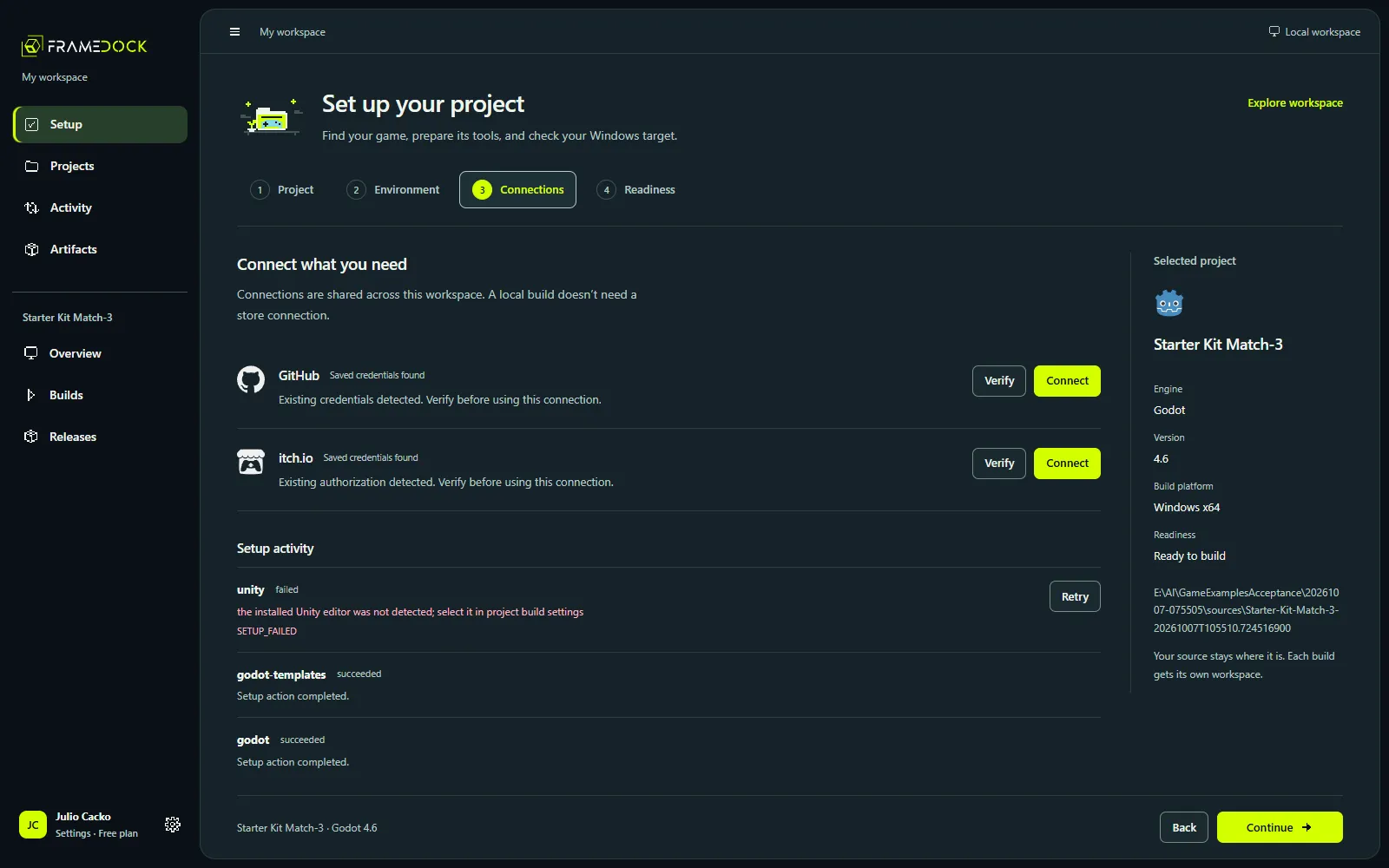
A local build does not require a store account. If you want source access or publishing, use Connected accounts for GitHub, itch.io or Unity, then Project settings → Publishing for the destination. Discord delivery notifications are optional.
What you should see
Only the services you intend to use are configured. Detected credentials, verified account access and a complete publisher destination remain separate states.
A store connection is optional.
Skip connections for a local build. Add them later for repositories or publishing.
If something does not match
Confirm the provider account and its project permissions. A generic sign-in is not a Steamworks publisher grant. Use a private Steam branch and valid app/depot mapping; keep credentials out of screenshots and logs.
Open the recovery guideRun the final readiness checks
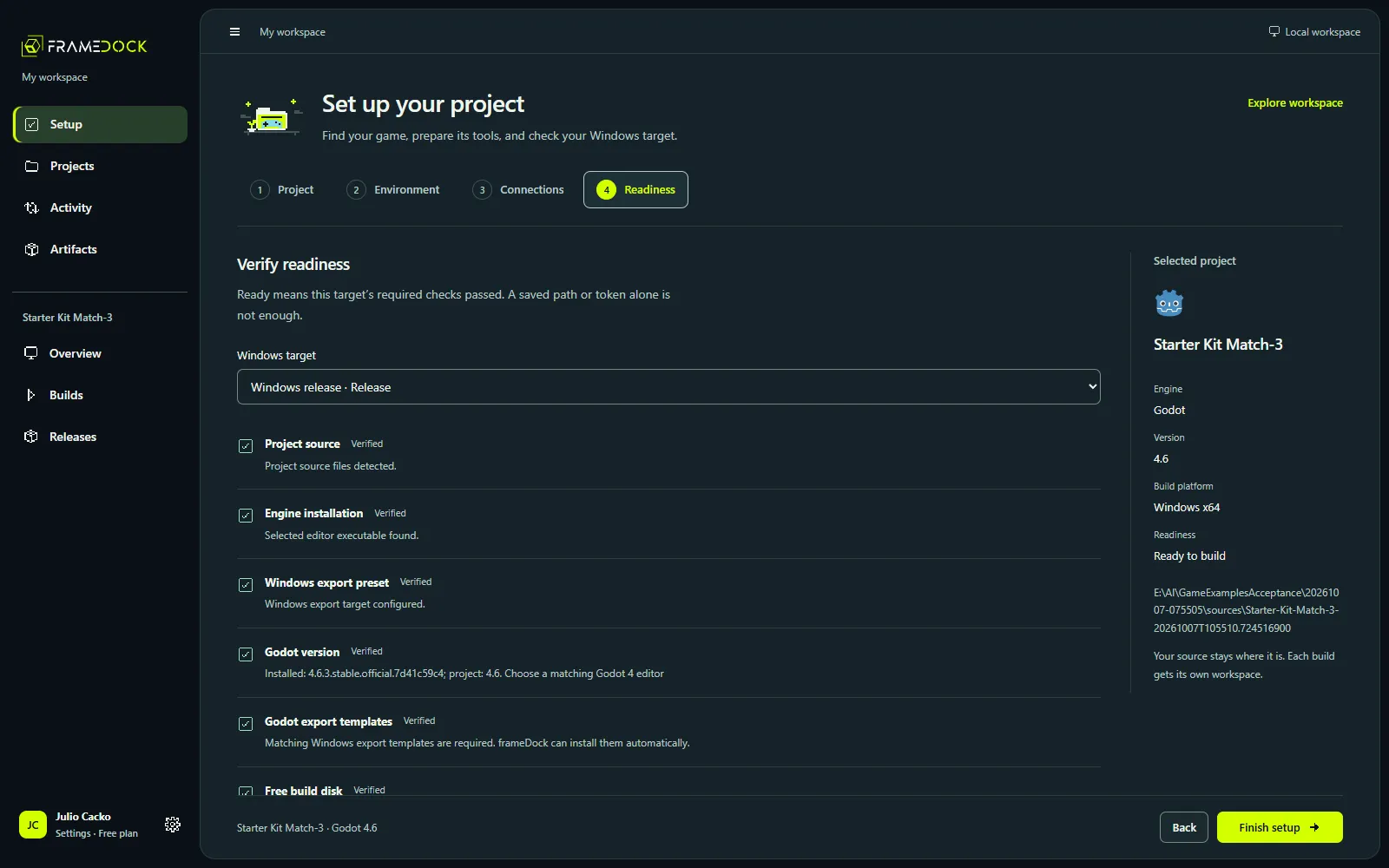
Open Setup → Readiness and recheck the selected target. Readiness allows you to start the build; completing first-run setup also requires a verified artifact from your project.
What you should see
The app reports Ready to build or Setup checks passed for the selected target. Optional publishing connections do not block a local build.
If something does not match
Return to the failing stage, resolve that specific requirement and recheck. Canceled or interrupted setup operations retain recovery/retry actions; a saved completion flag is not a substitute for current checks.
Open the recovery guideRun and inspect a build
From the project overview choose New build, select a supported target/configuration, and start the build. Follow progress and the raw log, or choose Play Solitaire while it runs. Wait for completion before inspecting the artifact.
Run a real Windows build
Start a Godot Windows release in the current interface and follow its completed artifact.
Read the walkthrough
- Open the existing Godot project after its required setup checks pass.
- Choose New build, keep the Windows release target, and start the actual run.
- Follow the real build while the production build service exports and archives the game.
- Inspect the new completed artifact.
What you should see
A completed run has a game archive and file manifest.
If something does not match
Open the original log, identify the first actionable error, resolve it and retry. Cancel when necessary. An interrupted run can recover on restart; a canceled run produces no usable artifact.
Open the recovery guideCheck the files and play the game
Inspect the archive’s listed files and SHA-256 values. Extract it into a fresh folder while preserving Linux executable permissions, then launch its recorded entrypoint on a compatible computer. Check its entry screen, input and the main behavior that matters for your project. Keep the build configuration and log with the artifact.
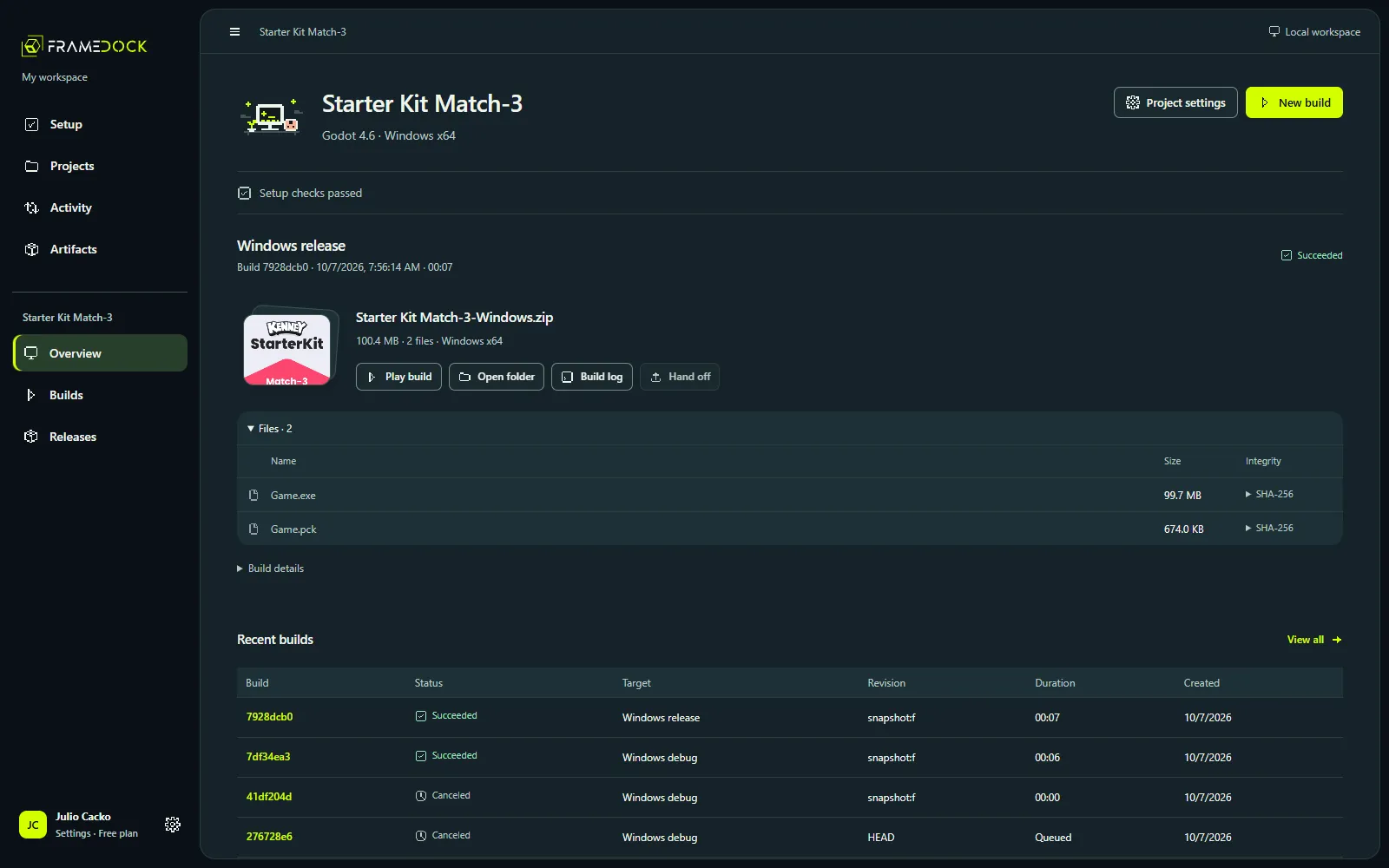
What you should see
The extracted files match the manifest and the actual game launches and responds. This is your first real result.
If something does not match
If the game fails to launch, check the artifact platform, executable permissions, missing files, runtime dependencies and configuration. For a cross-export, use the matching operating system to play.
Open the recovery guide